● Live demo · Built by TECHMA
Online form builder and survey software, ready to use as a templateAsk well. Get answers.
Askwell is a form builder for businesses that need real answers: client intake, event registrations, feedback surveys, job applications and quotes. Build a form, add rules, take payments, and read every answer in one place.
One click, no account. You get your own sample workspace with real forms and answers, cleared after seven days.
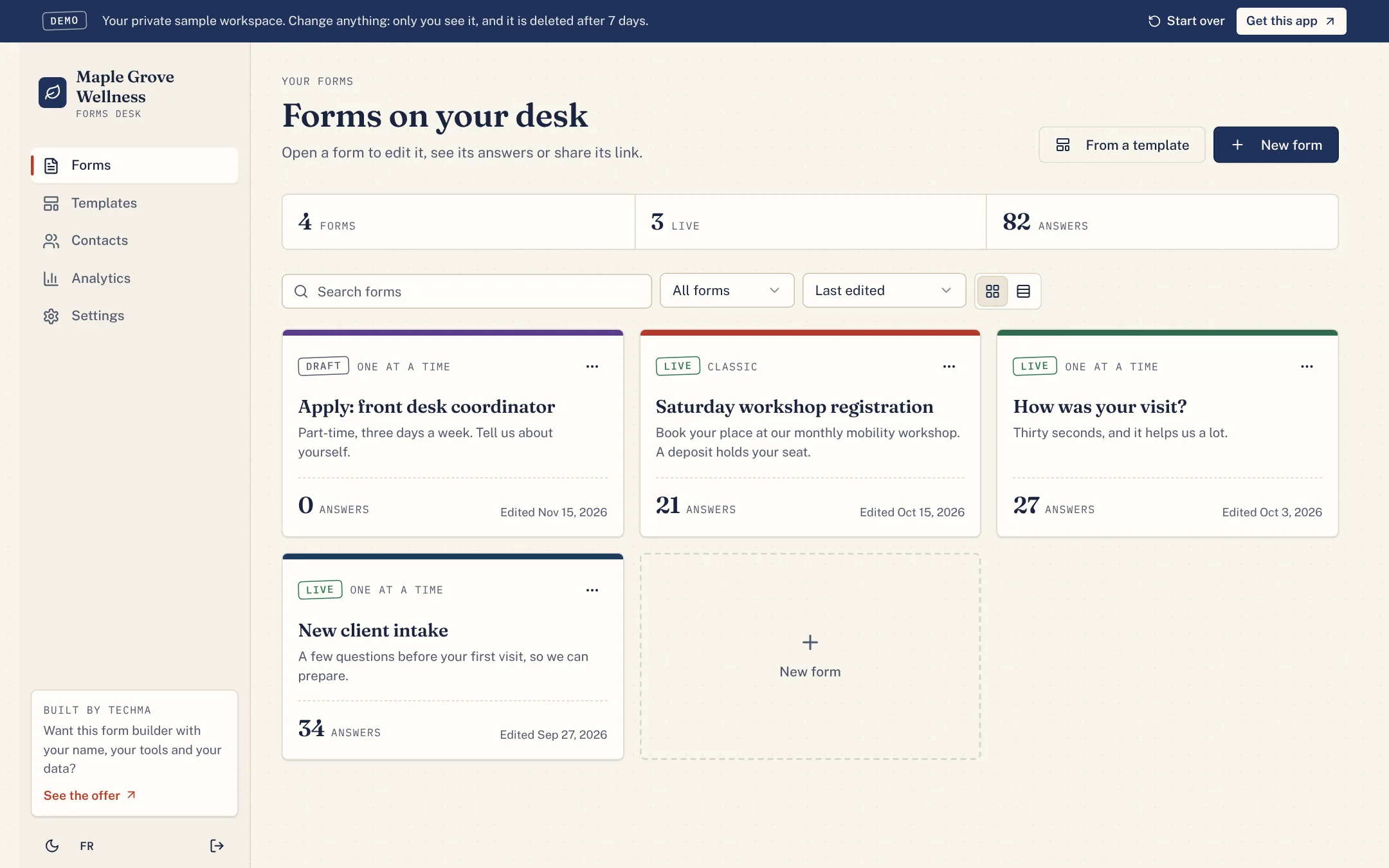
Folio 01 · The problem
The form is easy. Everything around it is not.
Most businesses can make a form. The trouble starts when the answers arrive.
Too many questions
Everyone sees every question, even the ones that do not apply to them. Half of them give up before the end.
Answers in a pile
Answers land in an inbox or a spreadsheet. Nobody knows who has been called back, and the contact details are copied by hand into the CRM.
A plan that grows
The tool charges by answers, by seats or by feature. The month you get the most interest is the month you hit the limit.
Folio 02 · The desk
Everything a form needs, in one app
Build, share, collect and act. Each part is useful on its own; together they close the loop from question to follow-up.
Form builder
15 question types, sections, click or drag to add, saved as you type.
Read more →02Conditional logic
Show a question only when an earlier answer calls for it.
Read more →03Design and branding
Colours, font, button corners, progress style, welcome and thank-you screens.
Read more →04Share: link, QR code, embed
A link, a QR code to print, or a frame for your website.
Read more →05Answers and contacts
Every answer in a table, contacts built from your forms, CSV export.
Read more →06Statistics
Answers by day, by form, and per question.
Read more →07Payments with Stripe
Take a card payment inside the form, with your own Stripe account.
Read more →08Zoho CRM and email alerts
Send answers to Zoho CRM as leads, and alert your team by email.
Read more →09English and French forms
The app and every form in English or French, down to the button.
Read more →Builder
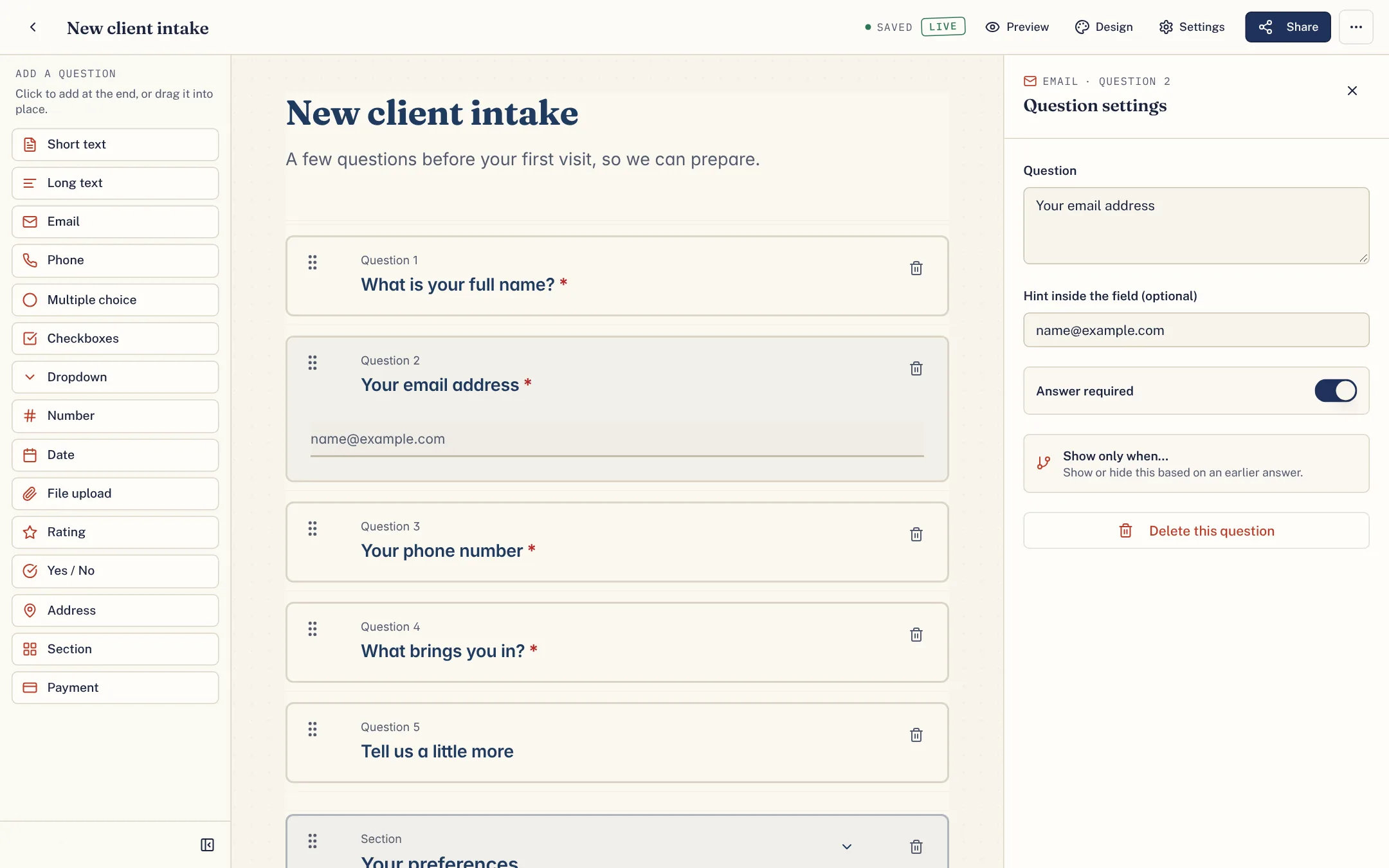
Add a question, see it as they will
Click a question type to add it, or drag it where it belongs. The form on the canvas looks exactly like the one people will answer, in its own colours.
- 15 question types, from short text to payment
- Sections to group questions on one page
- Saved as you type, with a clear saving status
Rules
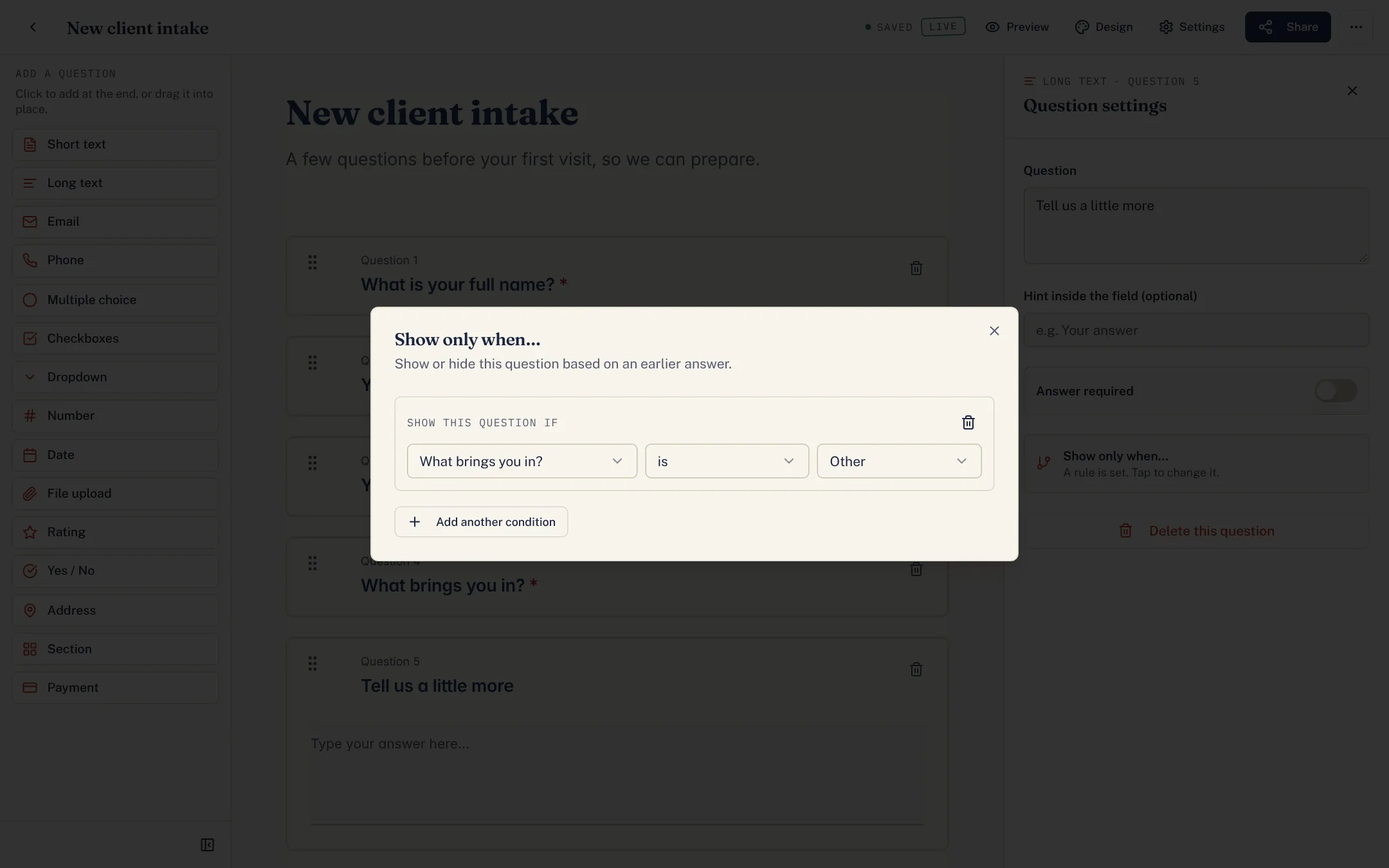
Only the questions that apply
Show a question only when an earlier answer calls for it. A yes opens a follow-up, a low rating asks what went wrong, a service choice opens its own questions.
- Conditions on choices, yes or no, numbers and text
- Match all conditions or any of them
- Hidden questions are skipped, not just greyed out
Answers
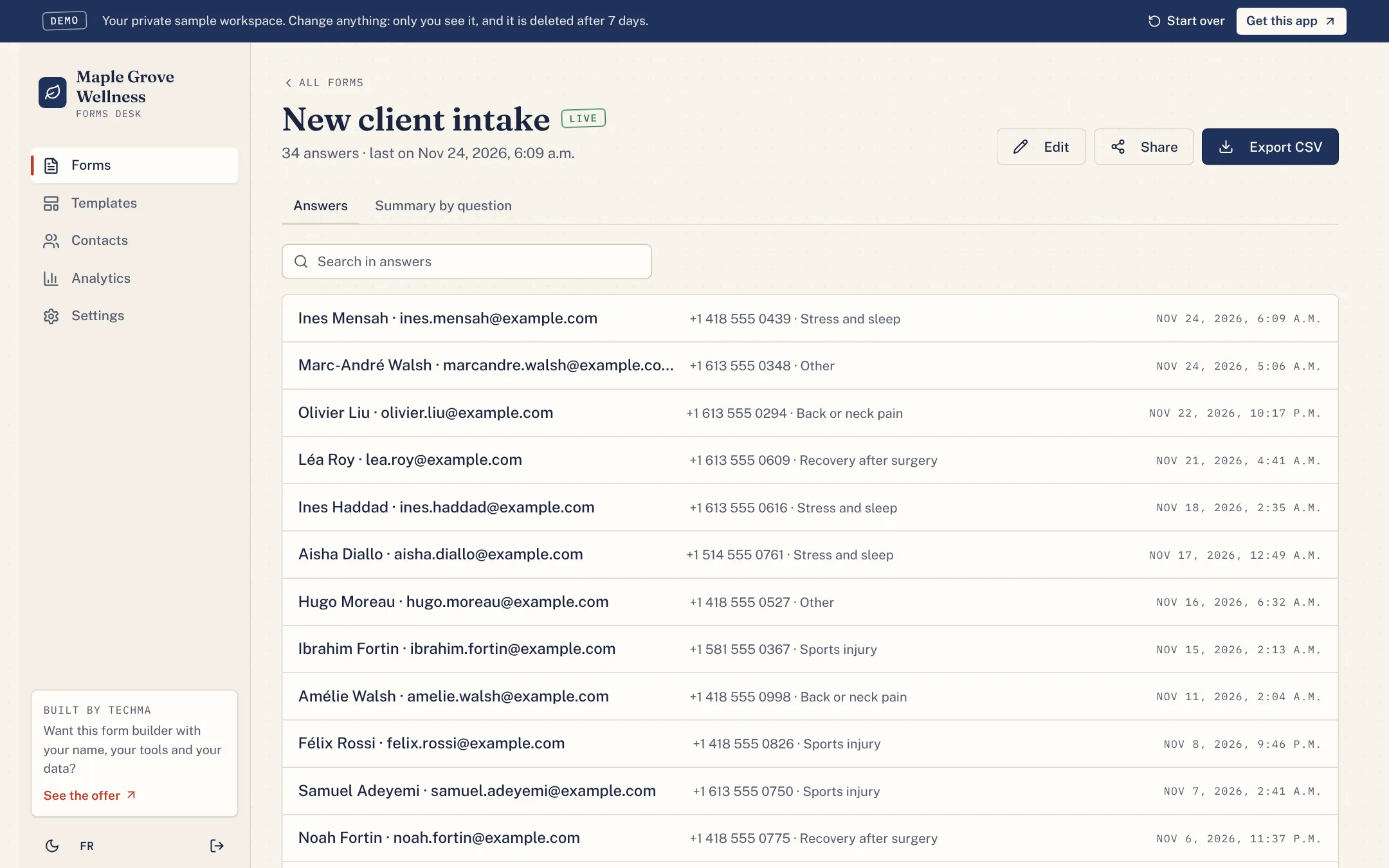
Every answer, and who gave it
Answers arrive in a table you can search and export. Anyone who left an email or a phone number joins your contacts, linked to the form they answered.
- Search, read one answer at a time, export to CSV
- Contacts built from your forms, with their own export
- Statistics by day and by form
Folio 03 · The workflow
From a blank page to a follow-up
Every form goes through the same five steps. Askwell keeps them in one place.
Draft
Start from a template or a blank page. Pick one question at a time or one page.
Build
Add questions, sections and rules. Choose colours, font and button style.
Publish
Share a link, a QR code or an embed. Back to draft at any time.
Collect
Answers, contacts and payments arrive. Email alerts tell the right person.
Act
Export, send to the CRM, call back. The answer turns into work done.
Folio 04 · The teams
Made for businesses that ask
Service businesses
Intake forms, quote requests and appointment requests that arrive complete.
Read more →02Clinics and wellness
New patient intake, appointment requests and follow-up surveys.
Read more →03Events and workshops
Registrations with choices, dietary needs and payment in one form.
Read more →04Hiring
Job application forms with resumes, availability and screening questions.
Read more →05Agencies
Briefs, lead forms and client surveys, in each client's colours.
Read more →06Non-profits and associations
Memberships, volunteer sign-ups and member surveys, in both languages.
Read more →Folio 05 · The offer
This is real software. You can have it.
Askwell is one of the applications TECHMA has built for clients. If it fits your business, there are three ways to get it.
Buy the source code
You get the code of the app and run it yourself.
On quote
- Full source code of the application
- Setup instructions for your developers
- Host it where you want
- No fee per answer or per user
TECHMA builds yours
We start from Askwell and shape it around your forms and your follow-up.
On quote
- Your brand, questions and rules
- Connections to the tools you already use
- AI features where they save real time
- Training for your team
Managed for you
TECHMA hosts, updates and supports the app. You just use it.
On quote
- Hosting, backups and updates included
- Support when something is unclear
- Changes made on request
- One monthly invoice
Folio 06 · The notes
From the form desk
How to write survey questions
Neutral wording, one idea per question, the right answer type.
Read more →02Raise your form completion rate
Fewer questions, rules, a clear start and a phone-friendly layout.
Read more →03Conditional logic, step by step
When to use rules, and five patterns that work.
Read more →Folio 07 · The library
Templates, definitions and comparisons
Everything we have written to help a business ask better questions, whether or not it ends up using Askwell.
Templates
Askwell as an app template, and free form templates.
Read more →02Glossary
Twenty form and survey terms explained in plain words.
Read more →03Comparisons
Askwell next to Typeform, Google Forms, Jotform and five others.
Read more →04Regions
Québec, Canada, the United States, Europe and Africa, city by city.
Read more →Free tools
Calculators and checklists for surveys
Small tools for the questions every survey raises. Free, no account, and what you type stays in your browser.
Form completion time estimator
Free estimator: count your choice, short text and open questions to see how many minutes your form or survey takes, and what to announce to people.
Read more →02Form launch checklist
Free checklist to test an online form before you share it: questions, rules, phone layout, privacy, alerts, payments and links. Tick items as you go.
Read more →03Form privacy checklist
Free checklist to review the personal information your online form collects: purpose, consent, access, retention and the rules to check in Québec and beyond.
Read more →04NPS calculator
Free NPS calculator: enter how many promoters, passives and detractors answered your survey and get your Net Promoter Score from -100 to 100.
Read more →05Survey invitation email generator
Free generator: answer eight questions and get a short, clear survey invitation email that says why, how long and by when. Copy it into your mailbox.
Read more →06Survey response rate calculator
Free calculator: enter invitations sent, bounces, starts and submissions to get your survey response rate, start rate and completion rate.
Read more →Questions
Asked before the first call
What is Askwell?
Askwell is a web application for building forms and surveys. You add questions, set rules that show or skip them, choose the look, share a link, a QR code or an embed, and read the answers, the contacts and the statistics in one workspace.
Can I try it without an account?
Yes. One click opens your own sample workspace, filled with example forms and answers in English or French. Change anything: the workspace is cleared after seven days.
Who built Askwell?
TECHMA designed and built it from a form builder made for a client. The client's name and data are not shown. What you see is the same software with sample data.
Can my business get this app?
Yes, in three ways: buy the source code and run it yourself, have TECHMA adapt it to your business and brand, or let TECHMA host and manage it for you. The three options are on the Get this app page.
Is it a Typeform clone?
No. Askwell has its own name, design and code. Like several form tools, it can show one question at a time; it can also show the whole form on one page. The comparison pages say honestly where other tools fit better.
Does it work in French?
Yes. The whole app and every form can be in English or in French. A French form says Envoyer, not Submit, and its messages are in French too.
Does it work on a phone?
Yes, both sides. People answer on their phone, and you can build and edit a form from a phone, with the question settings in a sheet that slides up.
● Your turn
Build a form. Answer it.
Askwell is a working application, not a mock-up. Open it, add a question, set a rule, publish, then answer your own form from your phone and watch the answer arrive.