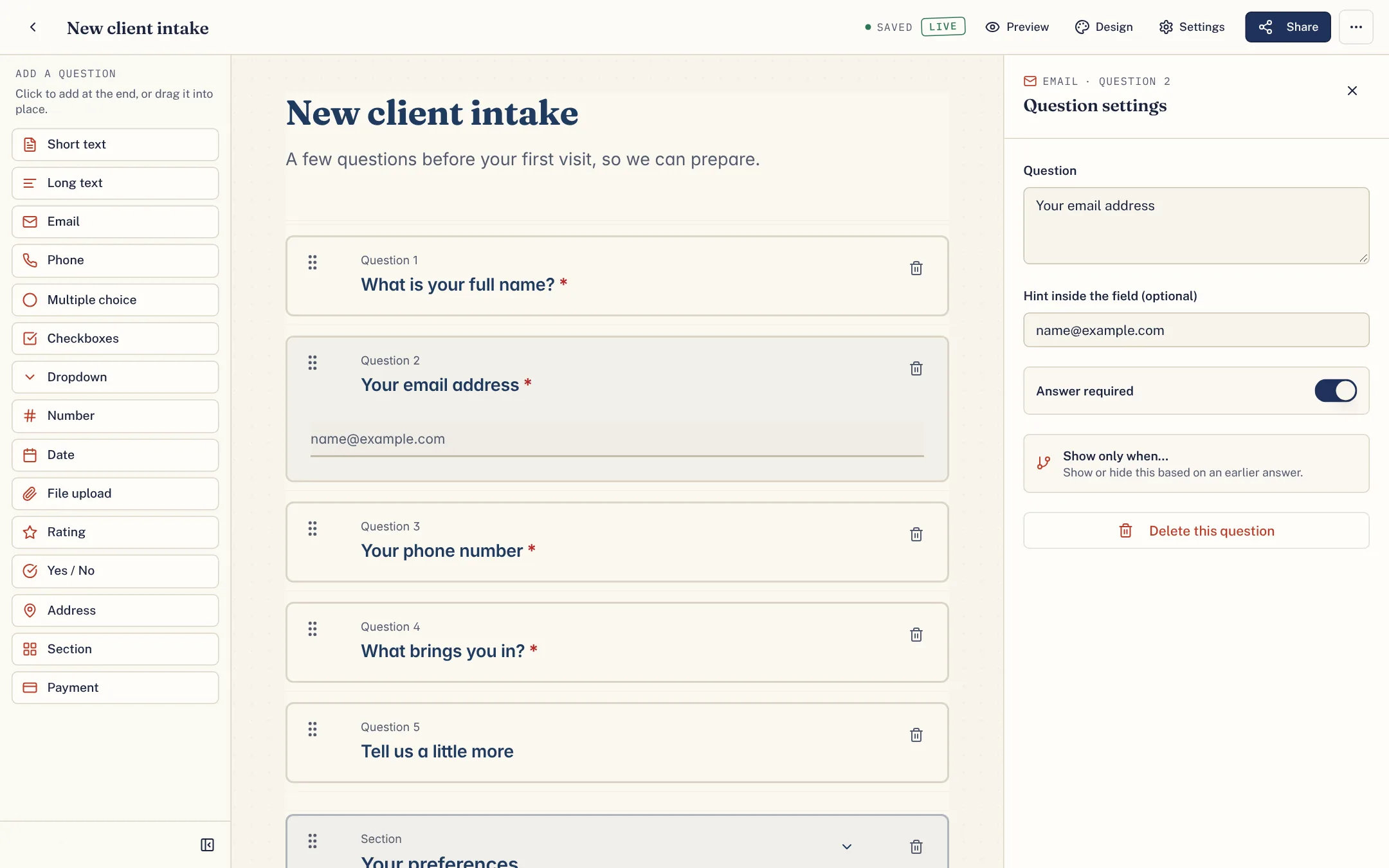
Fifteen question types
Each type collects the answer in the right shape, so you do not have to clean it later.
- Short text and long text for names and open comments.
- Email and phone, checked as they are typed, and used to build your contacts.
- Multiple choice, checkboxes and dropdown for one or several answers from a list.
- Number and date for quantities, budgets and preferred days.
- Rating and yes or no for quick opinions.
- Address in separate lines, ready for a mailing list.
- File upload for a resume, a photo or a document. In the demo only the file name is kept; your own version stores the file.
- Payment, taken by card through your own Stripe account.
- Section to group questions under a title.
Click or drag
On a computer, click a question type to add it at the end, or drag it to the exact place in the form. Its settings open right away: the question, a description, whether it is required, the choices.
On a phone, the same builder works with a button to add a question and the settings in a sheet that slides up from the bottom.
Saved as you type
There is no Save button to forget. Changes are saved after a short pause, and the header says Saving or Saved. Publishing is a separate step, so a half-finished change never reaches the people answering.
One question at a time, or one page
Choose per form. One question at a time feels like a conversation and works well on phones. One page suits short forms and people who want to see everything before they start. You can switch at any time.